
Creating an Amazon EKS cluster takes a few minutes. Creating one you can safely run customer traffic on for years—upgrade it, scale it, audit it, and hand it to another engineer—takes deliberate design. This guide walks through the production baseline we use for EKS: the network, the cluster, access, workload identity, compute, ingress, security, observability, and cost controls, with Terraform and Kubernetes manifests you can adapt.
Everything here is infrastructure as code. If a setting only exists because someone clicked it in the console, it will drift, and nobody will remember why it is there when the cluster is two versions behind.
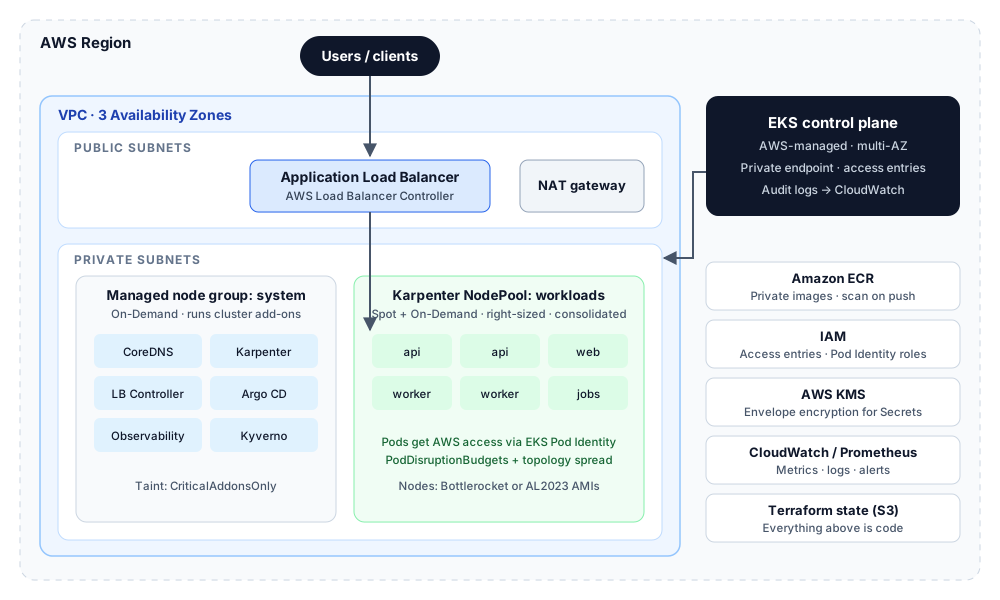
What “production-ready” means for EKS
Before writing Terraform, agree on what done looks like. These are the criteria we hold every production cluster to:
- Worker nodes run in private subnets across at least three Availability Zones.
- The Kubernetes API endpoint is private, or public access is restricted to known CIDR ranges.
- Cluster access is managed through EKS access entries mapped to IAM roles—never shared kubeconfigs or long-lived user keys.
- Pods get AWS permissions through EKS Pod Identity (or IRSA), never through node instance roles.
- Kubernetes Secrets are envelope-encrypted with a customer-managed KMS key.
- Control plane audit logs are shipped to CloudWatch Logs with a retention policy.
- Every workload has resource requests, a PodDisruptionBudget where it matters, and spreads across zones.
- There is a written, rehearsed upgrade path and a tested restore procedure.
1. Network foundation: a VPC built for EKS
EKS clusters live and die by their subnets. The AWS VPC CNI gives every pod a real VPC IP address, so a small CIDR runs out of addresses long before it runs out of CPU. Start with a /16, give private subnets most of the space, and tag subnets so the AWS Load Balancer Controller and Karpenter can discover them automatically.
module "vpc" {
  source  = "terraform-aws-modules/vpc/aws"
  version = "~> 5.0"

  name = local.name
  cidr = "10.0.0.0/16"

  azs             = ["ap-south-1a", "ap-south-1b", "ap-south-1c"]
  private_subnets = ["10.0.0.0/19", "10.0.32.0/19", "10.0.64.0/19"]
  public_subnets  = ["10.0.96.0/22", "10.0.100.0/22", "10.0.104.0/22"]

  enable_nat_gateway     = true
  single_nat_gateway     = false # one NAT per AZ in production
  one_nat_gateway_per_az = true

  public_subnet_tags = {
    "kubernetes.io/role/elb" = 1
  }

  private_subnet_tags = {
    "kubernetes.io/role/internal-elb" = 1
    "karpenter.sh/discovery"          = local.name
  }
}
A single shared NAT gateway is fine for non-production and saves money, but in production it becomes a cross-AZ dependency: if that zone fails, every private subnet loses outbound internet. One NAT per AZ costs more and removes that failure mode. Add VPC endpoints for ECR, S3, STS, and CloudWatch Logs so image pulls and AWS API calls stay on the AWS network and reduce NAT data charges.
2. The cluster: Terraform EKS module
The community terraform-aws-modules/eks module encodes most AWS recommendations and is the fastest way to a well-structured cluster. Pin the module version and treat upgrades of the module itself as reviewed changes.
module "eks" {
  source  = "terraform-aws-modules/eks/aws"
  version = "~> 20.0"

  cluster_name    = local.name
  cluster_version = var.kubernetes_version # bump one minor version at a time

  vpc_id     = module.vpc.vpc_id
  subnet_ids = module.vpc.private_subnets

  # API access: private inside the VPC, public only from known ranges
  cluster_endpoint_private_access      = true
  cluster_endpoint_public_access       = true
  cluster_endpoint_public_access_cidrs = var.admin_cidrs

  # Envelope-encrypt Kubernetes Secrets with a customer-managed KMS key
  create_kms_key = true
  cluster_encryption_config = {
    resources = ["secrets"]
  }

  # Control plane logs to CloudWatch
  cluster_enabled_log_types              = ["api", "audit", "authenticator"]
  cloudwatch_log_group_retention_in_days = 90

  # Access entries replace the aws-auth ConfigMap
  authentication_mode                      = "API"
  enable_cluster_creator_admin_permissions = false

  cluster_addons = {
    coredns                = { most_recent = true }
    kube-proxy             = { most_recent = true }
    vpc-cni                = { most_recent = true, before_compute = true }
    eks-pod-identity-agent = { most_recent = true }
    aws-ebs-csi-driver     = { most_recent = true }
  }

  eks_managed_node_groups = {
    system = {
      ami_type       = "BOTTLEROCKET_x86_64"
      instance_types = ["m6i.large"]
      min_size       = 3
      max_size       = 4
      desired_size   = 3

      labels = { "node-role" = "system" }
      taints = {
        addons = {
          key    = "CriticalAddonsOnly"
          value  = "true"
          effect = "NO_SCHEDULE"
        }
      }
    }
  }

  node_security_group_tags = {
    "karpenter.sh/discovery" = local.name
  }
}
A few choices deserve explaining. The small system node group runs only cluster-critical add-ons such as CoreDNS, Karpenter, and the load balancer controller; the taint keeps application pods off it so a noisy workload cannot starve the components that keep the cluster alive. Bottlerocket is a minimal, container-focused OS with a read-only root filesystem and atomic updates, which shrinks the attack surface and makes node patching predictable. In production, prefer pinning add-on versions explicitly over most_recent once you have a tested combination, so a re-apply never upgrades an add-on by surprise.
How does your cloud measure up?
Score your setup across foundation, delivery, reliability, security, and cost in 3 minutes—instant results, no email needed.
3. Access: EKS access entries instead of aws-auth
For years, cluster access on EKS meant editing the aws-auth ConfigMap—one typo could lock everyone out. Access entries move that mapping into the EKS API, so it is managed like any other AWS resource, visible in CloudTrail, and recoverable. Map IAM roles (assumed through AWS IAM Identity Center or SSO), not individual IAM users.
  access_entries = {
    platform_admins = {
      principal_arn = var.platform_admin_role_arn
      policy_associations = {
        admin = {
          policy_arn   = "arn:aws:eks::aws:cluster-access-policy/AmazonEKSClusterAdminPolicy"
          access_scope = { type = "cluster" }
        }
      }
    }

    payments_team = {
      principal_arn = var.payments_team_role_arn
      policy_associations = {
        edit = {
          policy_arn = "arn:aws:eks::aws:cluster-access-policy/AmazonEKSEditPolicy"
          access_scope = {
            type       = "namespace"
            namespaces = ["payments"]
          }
        }
      }
    }
  }
Namespace-scoped policies give product teams what they need without cluster-wide rights. Keep a separate break-glass role with cluster admin, protected by MFA and alerting, and rehearse using it—an emergency role nobody can actually assume is not a control.
4. Workload identity with EKS Pod Identity
Pods should never borrow the node's IAM role. If they do, every pod on that node shares the same permissions, and a compromise of one workload exposes all of them. EKS Pod Identity binds an IAM role to a Kubernetes service account through the EKS API, with a simple trust policy that does not depend on per-cluster OIDC configuration. IRSA still works and is a valid choice, but Pod Identity is simpler to manage across many clusters.
data "aws_iam_policy_document" "pod_identity_trust" {
  statement {
    effect  = "Allow"
    actions = ["sts:AssumeRole", "sts:TagSession"]
    principals {
      type        = "Service"
      identifiers = ["pods.eks.amazonaws.com"]
    }
  }
}

resource "aws_iam_role" "orders_api" {
  name               = "${local.name}-orders-api"
  assume_role_policy = data.aws_iam_policy_document.pod_identity_trust.json
}

resource "aws_iam_role_policy_attachment" "orders_api_sqs" {
  role       = aws_iam_role.orders_api.name
  policy_arn = aws_iam_policy.orders_queue_access.arn # least privilege, one queue
}

resource "aws_eks_pod_identity_association" "orders_api" {
  cluster_name    = module.eks.cluster_name
  namespace       = "orders"
  service_account = "orders-api"
  role_arn        = aws_iam_role.orders_api.arn
}
The application only needs a matching service account; the AWS SDKs pick up credentials automatically through the Pod Identity agent add-on installed earlier.
apiVersion: v1
kind: ServiceAccount
metadata:
  name: orders-api
namespace: orders5. Compute: a system node group plus Karpenter
Karpenter provisions nodes directly from pending pod requirements instead of scaling fixed node groups. It picks instance types that fit the pods, mixes Spot and On-Demand capacity, and consolidates underused nodes. Install it with Helm onto the system node group, then describe what capacity is allowed with a NodePool and an EC2NodeClass.
apiVersion: karpenter.sh/v1
kind: NodePool
metadata:
  name: general
spec:
  template:
    spec:
      requirements:
        - key: karpenter.sh/capacity-type
          operator: In
          values: ["spot", "on-demand"]
        - key: kubernetes.io/arch
          operator: In
          values: ["amd64", "arm64"]
        - key: karpenter.k8s.aws/instance-category
          operator: In
          values: ["c", "m", "r"]
      nodeClassRef:
        group: karpenter.k8s.aws
        kind: EC2NodeClass
        name: general
      expireAfter: 720h # replace nodes at least every 30 days
  limits:
    cpu: "200"
  disruption:
    consolidationPolicy: WhenEmptyOrUnderutilized
    consolidateAfter: 5m
---
apiVersion: karpenter.k8s.aws/v1
kind: EC2NodeClass
metadata:
  name: general
spec:
  role: KarpenterNodeRole-prod-eks
  amiSelectorTerms:
    - alias: bottlerocket@latest # pin a version in production
  subnetSelectorTerms:
    - tags:
        karpenter.sh/discovery: prod-eks
  securityGroupSelectorTerms:
    - tags:
        karpenter.sh/discovery: prod-eks
Three settings matter most. The CPU limit is a safety net against runaway scaling. expireAfter guarantees nodes are recycled regularly, so patched AMIs actually reach the fleet. Consolidation removes waste, but it also moves pods—which is why PodDisruptionBudgets and graceful shutdown handling are part of the baseline, not optional extras. Allowing both amd64 and arm64 lets Karpenter choose Graviton instances, which are often cheaper for the same work, as long as your images are built for both architectures.
6. Ingress, DNS, and TLS
The AWS Load Balancer Controller turns Kubernetes Ingress and Service objects into Application and Network Load Balancers. Pair it with ExternalDNS to manage Route 53 records and AWS Certificate Manager for TLS, so a team can expose a service with a single manifest and no tickets.
apiVersion: networking.k8s.io/v1
kind: Ingress
metadata:
  name: orders-api
  namespace: orders
  annotations:
    alb.ingress.kubernetes.io/scheme: internet-facing
    alb.ingress.kubernetes.io/target-type: ip
    alb.ingress.kubernetes.io/listen-ports: '[{"HTTPS":443}]'
    alb.ingress.kubernetes.io/certificate-arn: arn:aws:acm:ap-south-1:111122223333:certificate/example
    alb.ingress.kubernetes.io/ssl-policy: ELBSecurityPolicy-TLS13-1-2-2021-06
    alb.ingress.kubernetes.io/healthcheck-path: /healthz
    external-dns.alpha.kubernetes.io/hostname: api.example.com
spec:
  ingressClassName: alb
  rules:
    - host: api.example.com
      http:
        paths:
          - path: /
            pathType: Prefix
            backend:
              service:
                name: orders-api
                port:
                  number: 80
Target type ip sends traffic straight to pod IPs, skipping an extra node hop. Use IngressGroups to share one load balancer across several services where that makes sense; every ALB adds a fixed monthly cost.
7. Security baseline
- Enforce Kubernetes Pod Security Standards at the restricted level for application namespaces using namespace labels.
- Add an admission policy engine such as Kyverno or OPA Gatekeeper to require resource requests, block privileged containers, and allow images only from your ECR registries.
- Apply default-deny NetworkPolicies per namespace and open only the traffic each service needs (enable network policy support in the VPC CNI or use a CNI such as Cilium).
- Turn on Amazon GuardDuty EKS Protection for audit-log and runtime threat detection.
- Scan images in ECR and fail CI on fixable high and critical vulnerabilities.
- Keep the node security group closed to the internet and use SSM Session Manager instead of SSH for node access.
8. Observability from day one
A cluster without telemetry is a cluster you debug by guessing. At minimum, collect node and pod metrics, container logs, and Kubernetes events, and alert on symptoms users feel rather than raw resource usage.
- Metrics: Amazon Managed Service for Prometheus with Grafana, or CloudWatch Container Insights if you want a fully managed starting point.
- Logs: Fluent Bit as a DaemonSet shipping to CloudWatch Logs or OpenSearch, with retention set per log group.
- Traces: OpenTelemetry Collector (the AWS Distro for OpenTelemetry add-on works well) exporting to X-Ray or your tracing backend.
- Alerts that matter: error rate and latency per service, pods pending for more than a few minutes, node NotReady, CoreDNS errors, and persistent volume capacity.
9. Cost controls
- Set resource requests from observed usage; inflated requests are the most common source of EKS waste because Karpenter provisions for what pods request, not what they use.
- Use Spot for stateless workloads and Graviton instances where images support arm64.
- Scale non-production clusters down outside working hours, or run them with smaller node limits.
- Add per-namespace cost visibility with Kubecost or OpenCost, and tag clusters and node classes for cost allocation.
- Watch NAT gateway and cross-AZ data transfer—VPC endpoints and topology-aware routing often cut these noticeably.
- Upgrade on time: clusters on versions in extended support are billed at a higher hourly control-plane rate.
Where EKS Auto Mode fits
EKS Auto Mode lets AWS manage compute, networking components, storage drivers, and node lifecycle for you, using Karpenter-based provisioning under the hood. It is a good fit for teams that want Kubernetes without operating the data plane and are comfortable with AWS-chosen defaults. Teams that need custom AMIs, specific add-on versions, or tight control over node configuration usually stay with the self-managed approach in this guide. Either way, the network, access, identity, security, and observability decisions above still apply.
Production readiness checklist
- VPC with private subnets in three AZs, subnet discovery tags, and VPC endpoints for ECR, S3, STS, and logs.
- Cluster created from Terraform with a pinned module version and remote, locked state.
- Private API endpoint or a restricted public CIDR list; access entries mapped to SSO roles.
- Secrets encryption with a customer-managed KMS key; control plane audit logs retained.
- System node group isolated with a taint; Karpenter NodePools with CPU limits and node expiry.
- Pod Identity roles per workload with least-privilege policies.
- Load Balancer Controller, ExternalDNS, and ACM certificates for ingress.
- Pod Security Standards, admission policies, and default-deny network policies.
- Metrics, logs, traces, and symptom-based alerts wired to on-call.
- Documented upgrade runbook rehearsed in staging, and a tested backup restore.
None of this is exotic, but skipping any one item tends to surface later as an outage, an audit finding, or a cluster nobody wants to upgrade. If you would rather start from a tested baseline than assemble it piece by piece, this is exactly what our Production Kubernetes Base module delivers on EKS.
Key takeaways
- Put worker nodes in private subnets across three AZs and size the VPC for pod IPs, not just nodes.
- Manage cluster access with EKS access entries mapped to SSO roles, and pod permissions with EKS Pod Identity.
- Run cluster add-ons on a small tainted system node group and let Karpenter provision workload capacity.
- Treat upgrades, backups, admission policies, and cost visibility as part of the baseline—not later improvements.
FAQ
Should I use EKS Pod Identity or IRSA?
Both give pods their own IAM role. Pod Identity is simpler to manage across many clusters because the association lives in the EKS API and the trust policy does not reference a per-cluster OIDC provider. IRSA remains a valid choice and is still needed for some cross-account or non-EKS scenarios.
Karpenter or Cluster Autoscaler on EKS?
Karpenter provisions nodes directly from pending pod requirements, picks instance types to fit, mixes Spot and On-Demand, and consolidates underused nodes. Cluster Autoscaler scales predefined node groups. Most new EKS clusters benefit from Karpenter for workloads, with a small managed node group for system add-ons.
Is EKS Auto Mode a replacement for this setup?
Auto Mode lets AWS manage compute, networking components, and node lifecycle. It suits teams that accept AWS defaults and want less data-plane operation. Teams needing custom AMIs, pinned add-on versions, or detailed node control usually keep the self-managed approach. Network, access, identity, and security design still apply either way.